> ## Documentation Index
> Fetch the complete documentation index at: https://akshanshgusain.mintlify.site/llms.txt
> Use this file to discover all available pages before exploring further.
# Composite Pattern
> Structural Patterns
Go through this example:
[Python Code example](https://github.com/akshanshgusain/design_patterns_py/tree/master/structural/composite)
## Definition
**“Composite design pattern composes objects into tree structures to represent part-whole hierarchies. It lets clients
treat individual objects and compositions uniformly”**
 ## Explanation
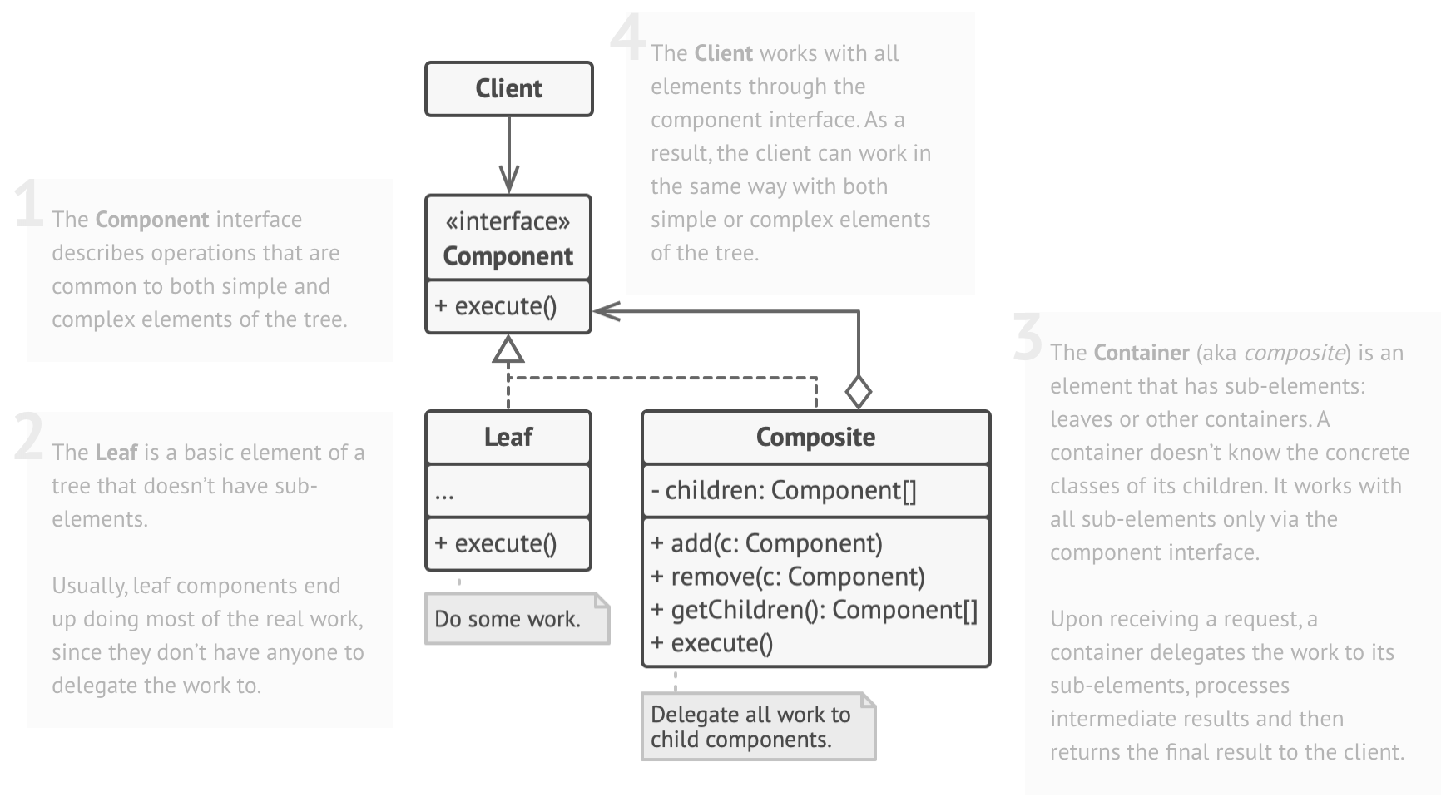
You define a Component interface with operations (e.g. render()). Leaf classes implement the interface for indivisible
objects (e.g. Circle). The composite class implements the interface and contains a list of Components (both leaves and
composites). Methods (e.g. render()) on the composite iterate over children and call their methods. The client interacts
with components through the common interface and doesn’t need to know if it’s a leaf or composite.
## Code
```python theme={null}
interface Graphic { void draw(); }
class Circle implements Graphic { void draw() { /* draw circle */ } }
class Square implements Graphic { void draw() { /* draw square */ } }
class CompositeGraphic implements Graphic {
List
## Explanation
You define a Component interface with operations (e.g. render()). Leaf classes implement the interface for indivisible
objects (e.g. Circle). The composite class implements the interface and contains a list of Components (both leaves and
composites). Methods (e.g. render()) on the composite iterate over children and call their methods. The client interacts
with components through the common interface and doesn’t need to know if it’s a leaf or composite.
## Code
```python theme={null}
interface Graphic { void draw(); }
class Circle implements Graphic { void draw() { /* draw circle */ } }
class Square implements Graphic { void draw() { /* draw square */ } }
class CompositeGraphic implements Graphic {
List children = new ArrayList<>();
void draw() { for (Graphic g : children) g.draw(); }
void add(Graphic g) { children.add(g); }
void remove(Graphic g) { children.remove(g); }
}
// Usage:
CompositeGraphic allShapes = new CompositeGraphic();
allShapes.add(new Circle());
CompositeGraphic group = new CompositeGraphic();
group.add(new Square());
allShapes.add(group);
allShapes.draw(); // draws a circle and a square
```
## Analogy
An organization chart: an employee (leaf) or a manager (composite) who has subordinates. You can ask any employee or
manager to report(), and managers forward the request to their team. Another example: a filesystem: files (leaves) and
directories (composites) both respond to open() or list(), with directories delegating to contained
files/subdirectories.
## Interview Insights
**Use Case**: Represent hierarchical data (graphics scenes, UI components tree, file systems, organizational structures).
When clients should treat all objects uniformly.\
**Advantages**: Simplifies client code (treat objects & groups the same). Makes it easy to add new kinds of components.\
**Disadvantages**: Can make design too general; components may have to expose child-management methods in interface.
Transparent composites can violate Open/Closed: adding a method to all children interface can break leaf classes if not careful.\
**Common questions**:“How do you traverse a composite structure?”, “Difference between Composite and Decorator?”, “What
if composites need to support only some operations?”, “How to prevent clients from adding children to leaf nodes?”.\\